
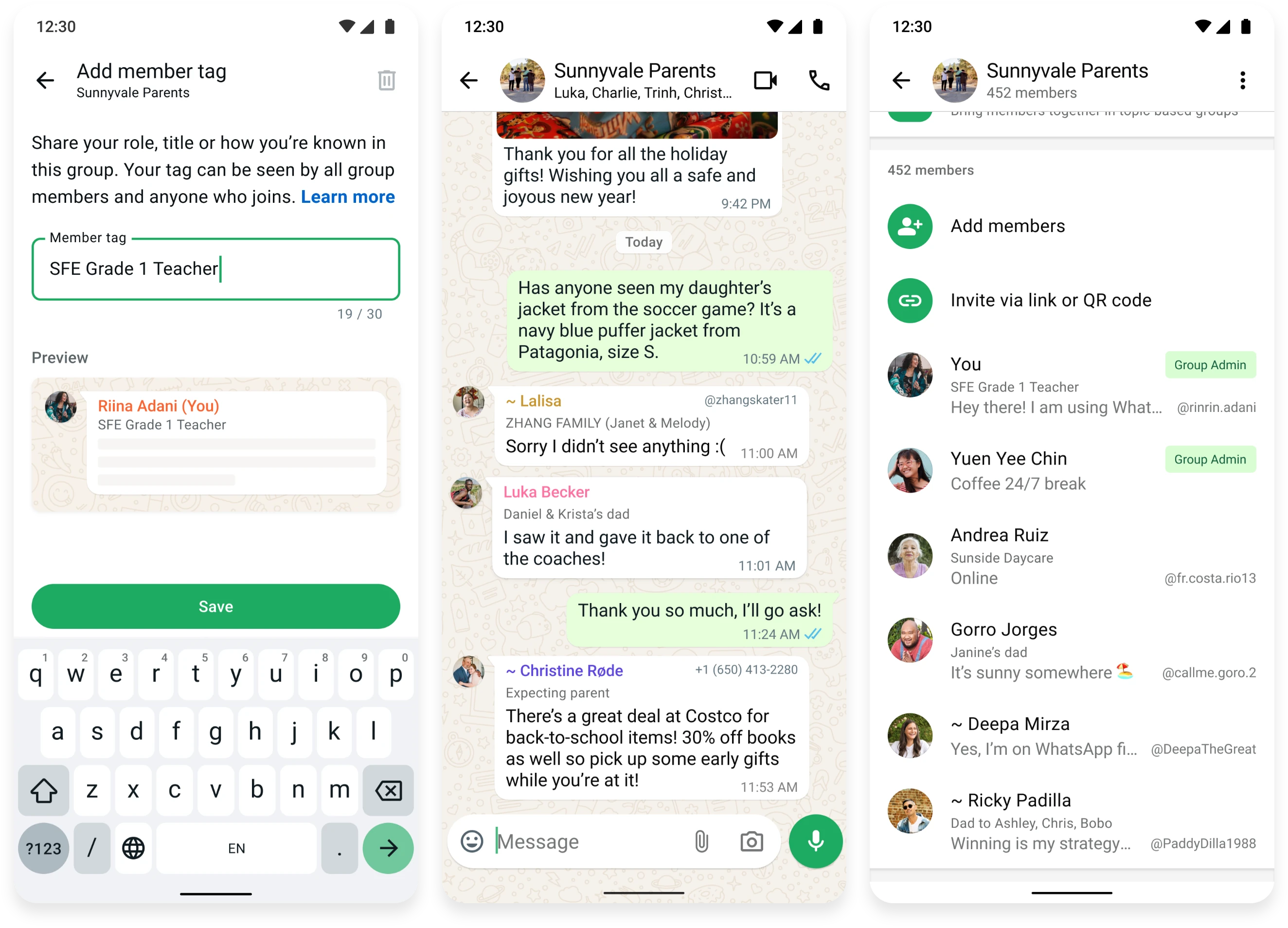
MEMBER TAGS
Member Tags is a WhatsApp feature that allows people to set a customizable label for themselves inside each group chat, separate from their account profile name, so others in the group chat can easily & quickly understand who they are.
Ex. Suzy can tag herself as “Auntie” in a family group, “Director of Sales” in a workplace group, and “Unit 4B” in a communal apartment group, all without changing her actual WhatsApp name anywhere else.
- ROLE
- Product Designer
- TEAM
- 1 Product Manager
7 Engineers
1 Content Designer
2 UX Researchers
1 Data Scientist - TIMELINE
- 1 week hackathon
9 months, 2025
IMPACT (WITHIN FIRST 3 MONTHS)
~82M users with ≥1 tag
3.1% DAILY ACTIVE USERS w/ 1.5M DAILY TAG CREATIONS.
133% increase in US adoption
ORGANIC GROWTH w/ MINIMAL FEATURE UPSELLS.
3x adoption rate
OUTPERFORMED INTERNAL ADOPTION TARGET.
93% positive sentiment
250+ ARTICLES GENERATED BY MEDIA AND USERS.
CONTEXT
From 2024, the company strategy pivoted to prioritize US adoption & usage of WhatsApp. Historically we have been one of the most used messaging apps (#2 behind native text messaging), but given the increasingly recent improvements in iMessage and competitors, our priority was to identify new opportunities.
Focus on real world/IRL networks which are tied to people’s offline lives, relationships, and meaningful communities (ex. school parent group, neighborhood watch, sports club). As we know, these generally tend to be medium-large sized groups with strong engagement & invite levers to grow the ecosystem of WhatsApp group chats.
PEOPLE
PROBLEM
87% of WhatsApp users said sending a first message in a medium to large group (33+ members) was a frequent pain point. New members often don’t know who anyone is, or how they’re connected to the group.
Display names don’t carry group-specific meaning, and they don’t let people show who they are in a particular group. You’re the same “you” everywhere. The common workaround was people changing their global display name (from “Suzy” to “Suzy – Dan’s Mom”), which then showed up in every other unrelated chat.
Group members that are connected IRL don’t recognize each other just by name.
UXR INSIGHT
In a classroom group, parents typically recognize other parents from their kids’ names (‘Zara’s dad’) and that’s the important identifier for them.
Group members that are NOT connected IRL need more meaningful context about others.
UXR INSIGHT
In a work/project chat, knowing others’ role (‘engineer’ or ‘Product Manager’) can help dictate the tone in chat or who to ask questions/have discussions with.
Users aren’t able to share their authentic selves or specific identities for each group.
UXR INSIGHT
Inside names/jokes are an important part of a group’s identity, culture and sense of belonging. Larger chats ‘can feel cold, when joining as a new member’.
BUSINESS
OPPORTUNITY
How might we make it easier for new group members to acclimate to larger chats? How might we make group chats more useful and engaging for real world/IRL networks?
Member tags can bridge that gap by:
Increasing group & 1:1 conversationsMore contextual info about each person will encourage members to participate in discussions faster and help generate more offshoot chats.
Building a sense of community and closenessKnowing a little more about each other makes it easier for members to find common ground, form new bonds and build lasting relationships.
Closing competitive gapsIt will give our product a stronger narrative in the competitive landscape (Messenger, Discord, Signal) by increasing our sense of messaging utility (beyond privacy) & encourage more ‘fun’ and user expression within WhatsApp.
RESULT
The bet on 1:1 conversations paid off. Message growth came mainly from 1:1 chats, even though tags only appear in groups. Knowing more about each other gave members a reason to start side conversations beyond the original group.
DESIGN
PRINCIPLES
- Identity is contextual. Design for the group someone is in, not one profile that follows them everywhere.
- Design for moments of intent. Invite people to add a tag when they join a group and want to introduce themselves, not with excess upsells or cold prompts.
- Comprehension over minimalism. Noise is about whether you can understand something quickly, not how much is on screen. Useful context can make a chat feel simpler.
SOLUTION
Intuitive entrypoint placement
Ensuring new and existing members discover this feature at the right moment of their user journey (joining a new group, engaging in chat) to ensure relevant visibility while minimizing impact to messaging experience.
Onboarding (new chat)
DESIGN CONSIDERATION
Upon joining a new group, members see a group info card with actions they can take. I added an entrypoint to help them provide more context about themselves.
Discovery (existing chat)
DESIGN CONSIDERATION
In chat, members can tap a name to view more details and actions. I added the member tag and CTA there so people could understand the feature in context and add one without leaving the conversation. Seeing another member’s tag provided a subtle invitation to explore it.
Permanent entry point (group info)
DESIGN CONSIDERATION
Group Info shows members’ identifiers, making it a natural place for member tags. A CTA in the user’s own row creates a permanent entrypoint to add, edit, or delete their tag.
RESULT
The new group join prompt drove 46% of tags created in the US, twice its share elsewhere (23%), and about half of US tags were added in groups less than 4 weeks old. Joining a group turned out to be the moment people most wanted to introduce themselves.
Adding & previewing member tag
Providing a clear description alongside use cases/suggestions (in the input field) helps onboard new users and explain how this feature can be used.
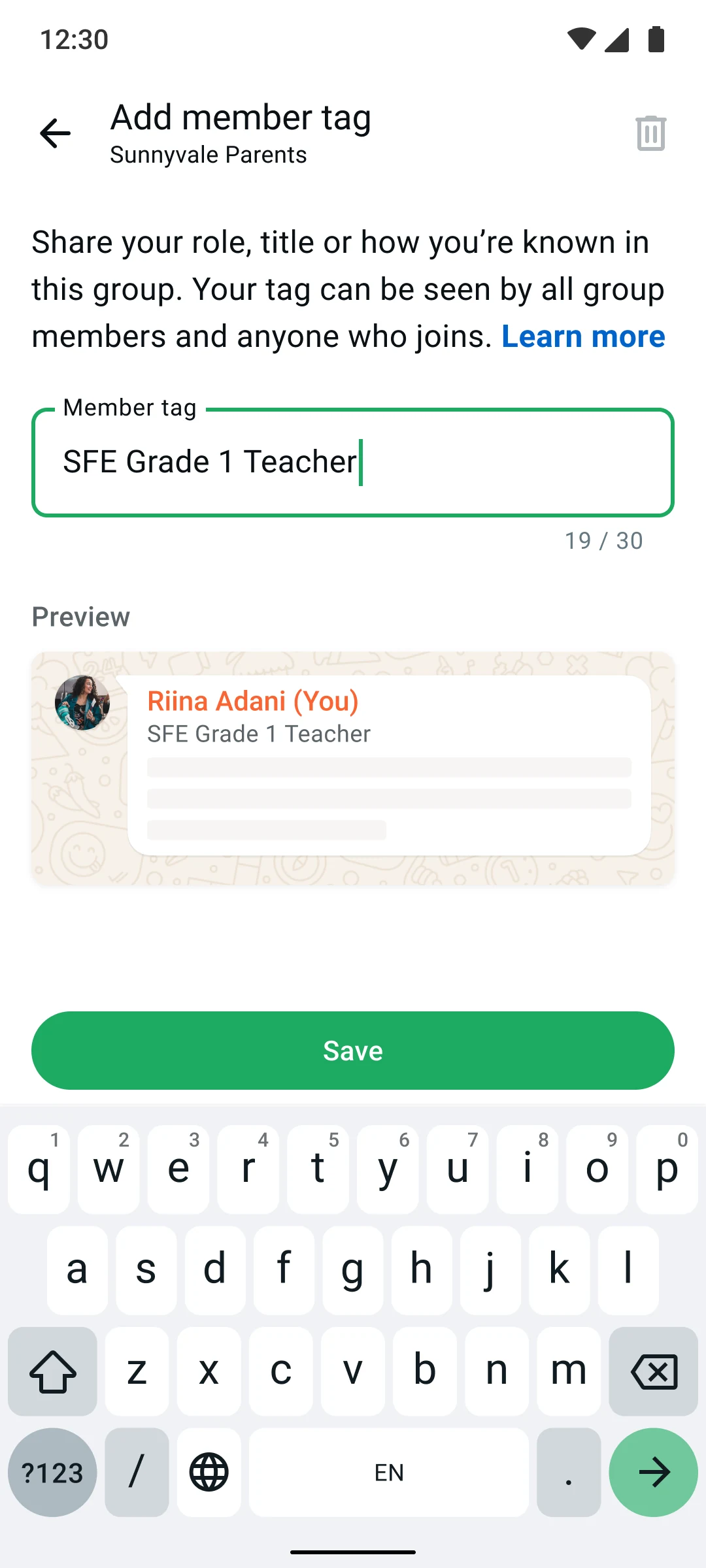
DESIGN CONSIDERATION
Visualizing how and where the member tag is rendered ensures the user knows how they will appear to other members in the chat.
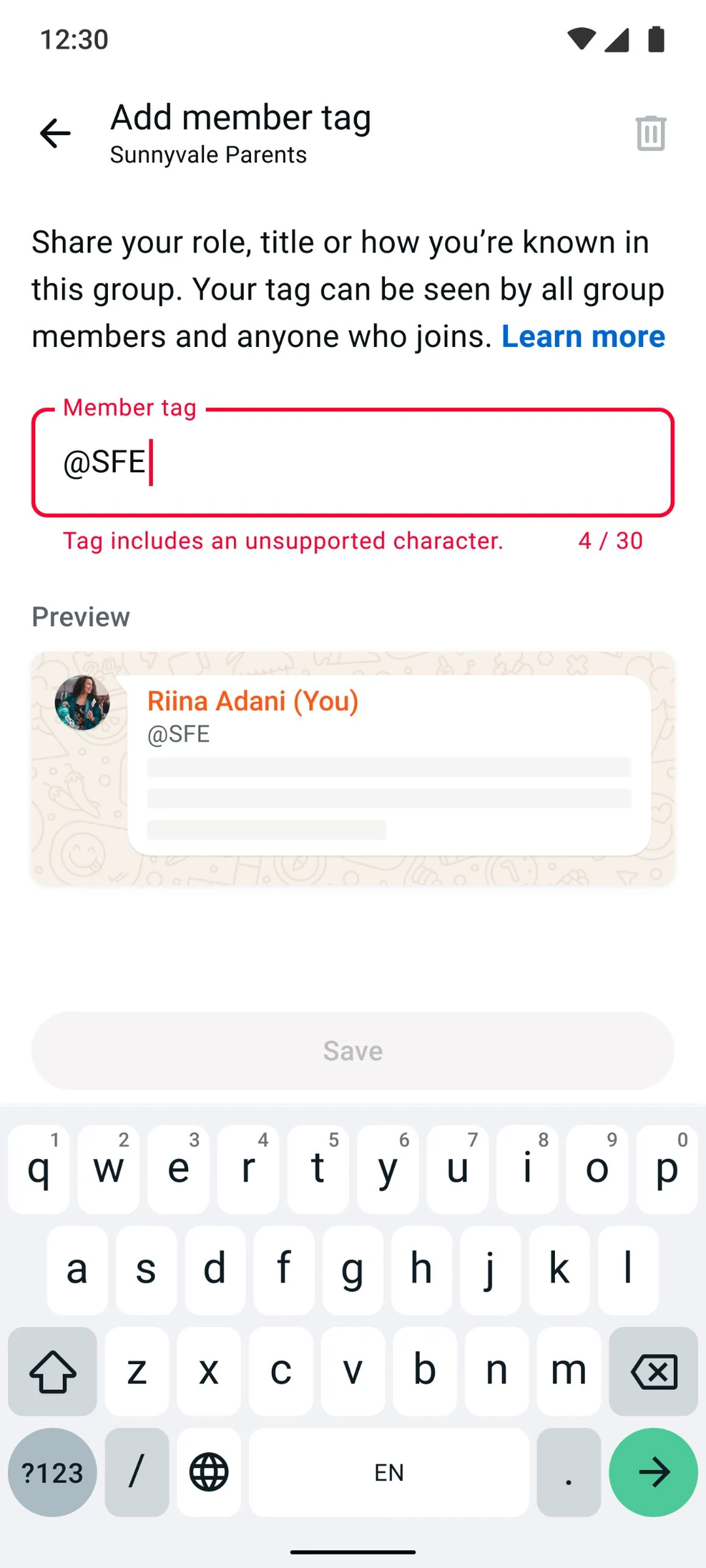
DESIGN CONSIDERATION
Utilized the same validation checks (ex. no special characters, no links) by our Integrity team, to limit what can appear in the input field and minimize misuse and bad actor scenarios.
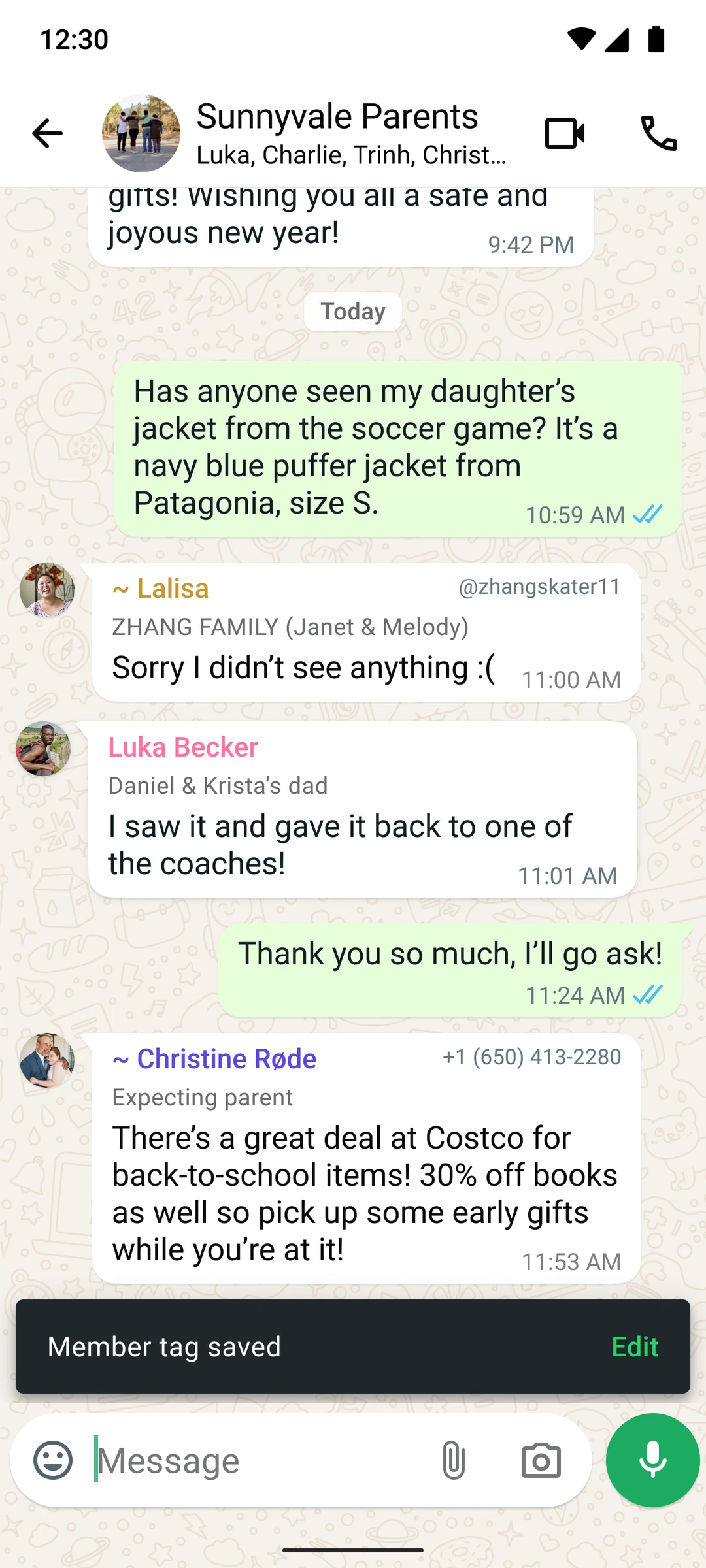
DESIGN CONSIDERATION
Members don’t see their own member tag in chat; by showing a confirmation toast upon addition or edit of a member tag, it validates the action to the user.
UXR INSIGHT
14 of 16 interview participants appreciated that examples clarified the use cases, helping them understand the feature and adopt it faster. They said it would be important to ship with the rest of experience.
Scannable label within message bubbles
Ensuring member tags have the right level of visual importance within the context of the chat. It should feel intuitive and additive to the conversation, not unnecessary noise.
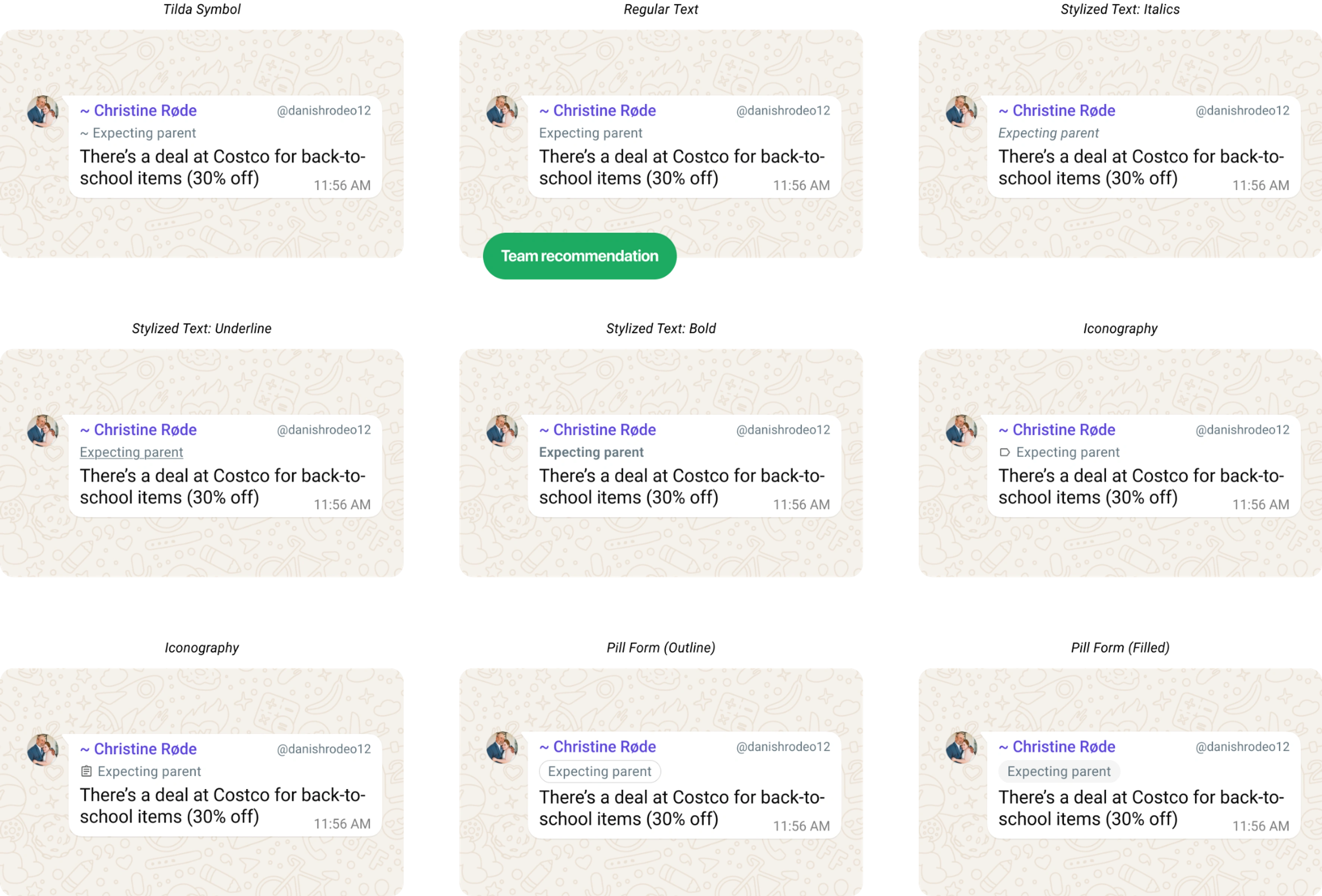
UXR VALIDATION
A common concern was that another label in every bubble would add clutter. I partnered with UX research to test it in a 16-person in-person usability study: all 16 participants found tags useful, ratings for clutter, information overload and visual appeal stayed positive, and 6 said tags made conversations easier to follow.
12 of 16 said having a different tag in each group let them reflect their different roles at work, in hobbies and with family.
Key product decisions
Rules I defined to keep tags personal, safe and useful, each grounded in research or in how people already use groups.
Only you can set your tag
Admins can’t assign tags, so no one can label you without your consent, and groups don’t take on extra moderation work.
Visible only in its own group
A tag set in one group never appears anywhere else, which solves the “Suzy – Dan’s Mom” problem of context leaking into unrelated chats.
Plain text only
No emoji, links or formatting. Tags stay readable and functional, and can’t be used to decorate or promote.
Edits apply to past messages
Like a name change, an updated tag shows on earlier messages too, so people can keep it current without worrying it’s permanent.
REFLECTION
What I learned
Visibility is a growth engine. Because tags show in message bubbles, every tagged message quietly prompts others to add their own. Adoption grew organically week over week without heavy notifications or onboarding.
One-off features can create lasting value. Product teams often favor features people return to every day. Member Tags showed why a one-time setup can still compound: a single label helped people recognize one another, start 1:1 conversations, and make groups feel more legible long after the initial unlock.
What’s Next
Pushing fun & expression further
I initially explored more ‘visual’ directions such as including emojis and incorporating color into the tag UI. Leadership pushed back over concerns that this would create unnecessary noise. Further UXR validation suggested that noise may not be the problem we expected, so I planned to revisit richer expression with clear guardrails and testing.
COMPETITIVE VALIDATION
After we launched, Signal also introduced group member labels—one of the few times we were ahead of the curve with competitors. Their launch reinforced our hypothesis that lightweight identity expression can be a meaningful direction for messaging products.