
Subgroup Discovery & Activation
Helping members find the right groups inside their community, and making it easier to bring more groups in. Once members can create more groups, discovery and early activation determine whether those groups become part of a thriving community. I focused on signals, descriptions and lower-friction joining so new groups could find their first members faster.

IMPACT
11% increase in subgroup join rate
MEMBER JOIN RATE ROSE FROM 45% TO 56% WITHIN EIGHT MONTHS OF LAUNCH.
~9% new groups activated
HIGHLIGHTING THE RANKING CHANGES IMPROVED GROUP DISCOVERY.
RESULT
The work made subgroups easier to understand and find, but also exposed the cold-start gap: most new groups still needed members in their first few days. That insight shaped the next investment in onboarding, invitations and early activation.
PEOPLE
PROBLEM
Member Suggested Groups grew the number of groups, but most new ones never took off. Only ~10% of member-created groups became active, mainly because too few people joined in the first few days.
Browsing a community gave people little to go on. Groups were listed alphabetically, with nothing to show how new, big or active each one was, and many had no description at all.
SOLUTION
Useful signals that help people choose groups
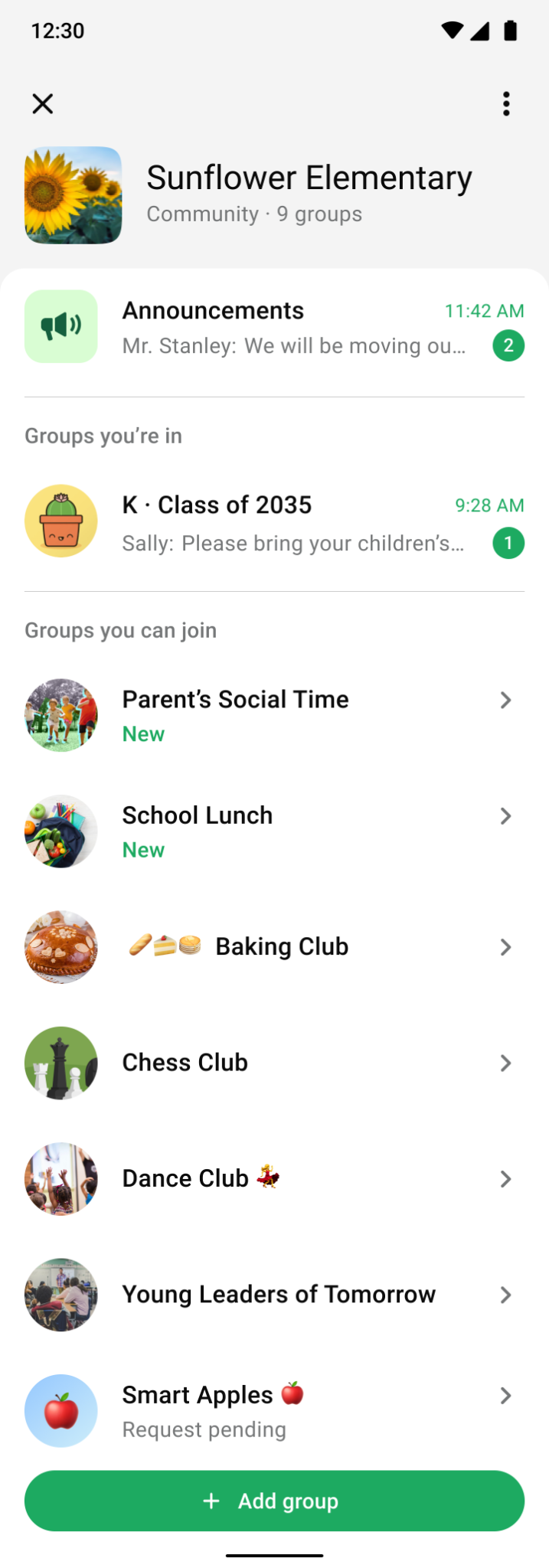
Only Android showed a “New” badge, and it vanished after the first visit. Everything else was alphabetical. I added simple signals and a ranking people could predict.
PREVIOUS EXPERIENCE
Groups shown alphabetically
On Android, new groups appeared at the top with a “New” label that disappeared after the first visit, making it easy to miss. We were also moving toward reserving “New” labels for feature launches.
The rest of the list was alphabetical, giving members little sense of how active a group was, how many members it had, or how long it had been around.
C-Nav
PROPOSED EXPERIENCE
Improving group discoverability with new signals
Group-specific signals give members more context as they browse for relevant groups and make the ranking easier to predict.
We chose “Recently added” and kept it visible for five days or until a member opened the group. We also showed member counts as a rough signal of group activity.
C-Nav (Improved)
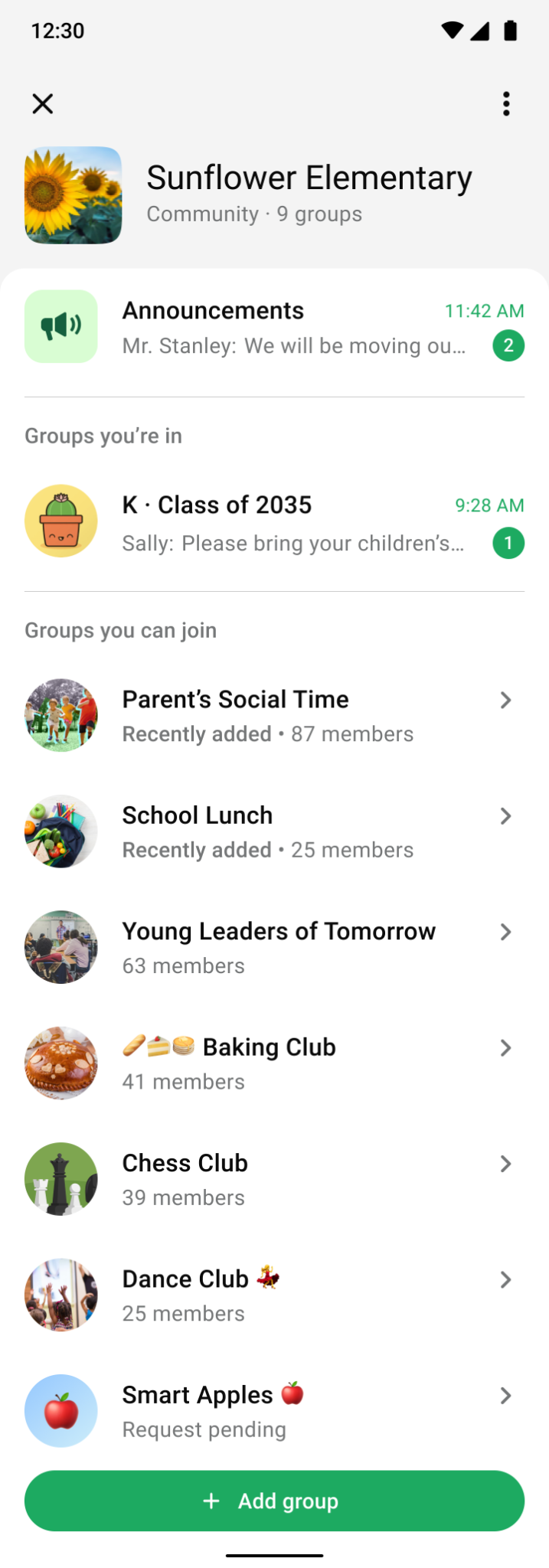
- New unjoined groups first
- Other unjoined groups, ranked by size
- Pending requests last
Every group describes itself
Descriptions were optional, and only appeared when members suggested a group. My hypothesis was that this held back both joins and admin approvals.
Group creation

Group join preview sheet

PREVIOUS EXPERIENCE
Lack of group description
The subgroup creation form had no description field. Prospective members often had only the name and photo to go on.
Admins also had less context when deciding whether to approve a suggested group.
Group creation

Group join preview sheet

PROPOSED EXPERIENCE
Adding group description & making it mandatory
A required description helps members decide whether to join. Helper text explains what to include, and the description appears in the group preview.
Admins also see the description when reviewing suggestions.
Adding a group to a community you’re already in
Admins can now link an existing group to a community directly from group info. This closes the loop by giving admins two starting points: they can add an external group within the community or start from the external group and add it to a community.
Add group to a new community
DESIGN CONSIDERATION
To help communities grow, I added the “Add group to a community” button in group info so people could easily bring an existing group into a community.
Add to a community you admin
DESIGN CONSIDERATION
Admins can add their group directly to a community they manage, helping it grow with an existing audience.
Suggest to a community you’re in
DESIGN CONSIDERATION
Community members can submit their group to the community admins for approval. Once approved, the group is added to the community.